Username Policy
Purpose
Define how usernames are generated for staff and students, so account creation stays consistent during onboarding and daily operations.
Why this matters before uploads
Username policy is used during both staff upload and student upload.
- If the
usernamecolumn is left empty, BassemLabs generates a username automatically using your policy. - If a manual username is provided, it is validated for format and uniqueness.
Set this policy before running bulk uploads to avoid failed rows and inconsistent username formats.
Where username policy is used
- Staff upload
- Student upload
- Adding a new teacher
- Enrolling a new student
How generation works (simple model)
- BassemLabs reads the username template.
- It fills template tokens (for example first/last name).
- It applies space handling (underscore, hyphen, dot, or remove spaces).
- It applies optional character limits for first/last name parts.
- It checks uniqueness inside the organization.
- If needed, it adds a sequence number (
{seq}) to avoid duplicates.
Template tokens
Required tokens:
{first_name}{last_name}{seq}(must be present and appear at the end)
Optional tokens:
- Student policy:
{birth_year},{enrollment_year},{graduation_year} - Teacher policy:
{birth_year}
Build template blocks (visual)
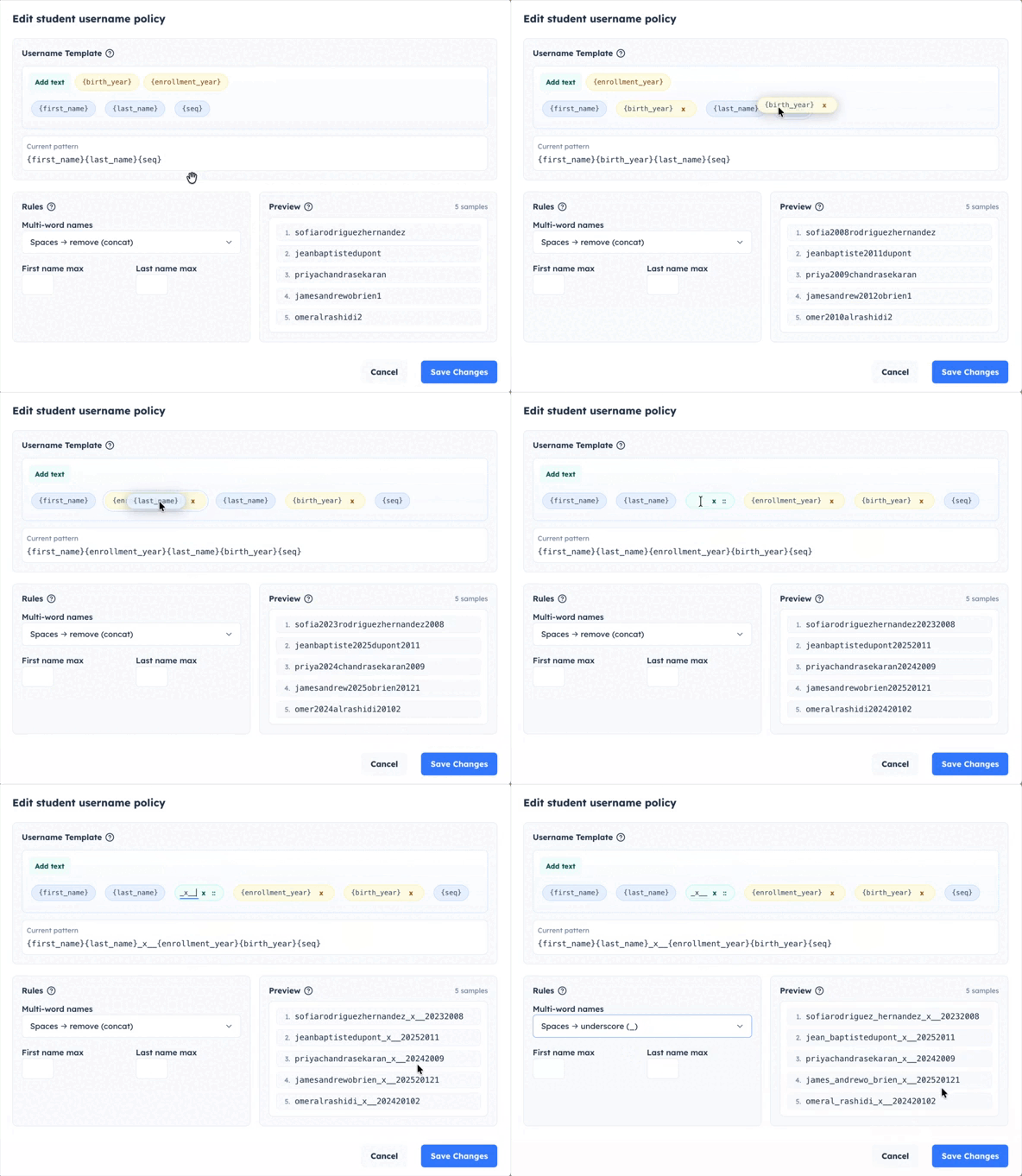
Example
Template:
{first_name}.{last_name}{seq}
With first name Jean Baptiste and last name Al Rashidi:
- Space handling = underscore:
jean_baptiste.al_rashidi - If already taken:
jean_baptiste.al_rashidi1, then...2, and so on
Important rules
- Usernames use lowercase letters.
- Allowed characters are letters, numbers,
.,_, and-. - Maximum length is 64 characters.
- Username uniqueness is checked across both students and staff in the same organization.
- If your template uses
{birth_year}or{enrollment_year}, that data must be available for the user being created. {graduation_year}is available for student policies. It is calculated from the student's grade and the selected school year's end year.
Recommended setup
- Keep one clear style for students and staff.
- Keep the template simple and readable.
- Keep
{seq}in the template to prevent duplicate failures. - Preview sample outputs before saving.
- After policy updates, download a fresh upload template and then upload.